
DealCheck Review 2026: Hands-On Features, Pricing, and Results
Honest DealCheck review for 2026: test results on property analysis, sales comps, rehab calculators, pricing tiers, and who should use or skip the tool.
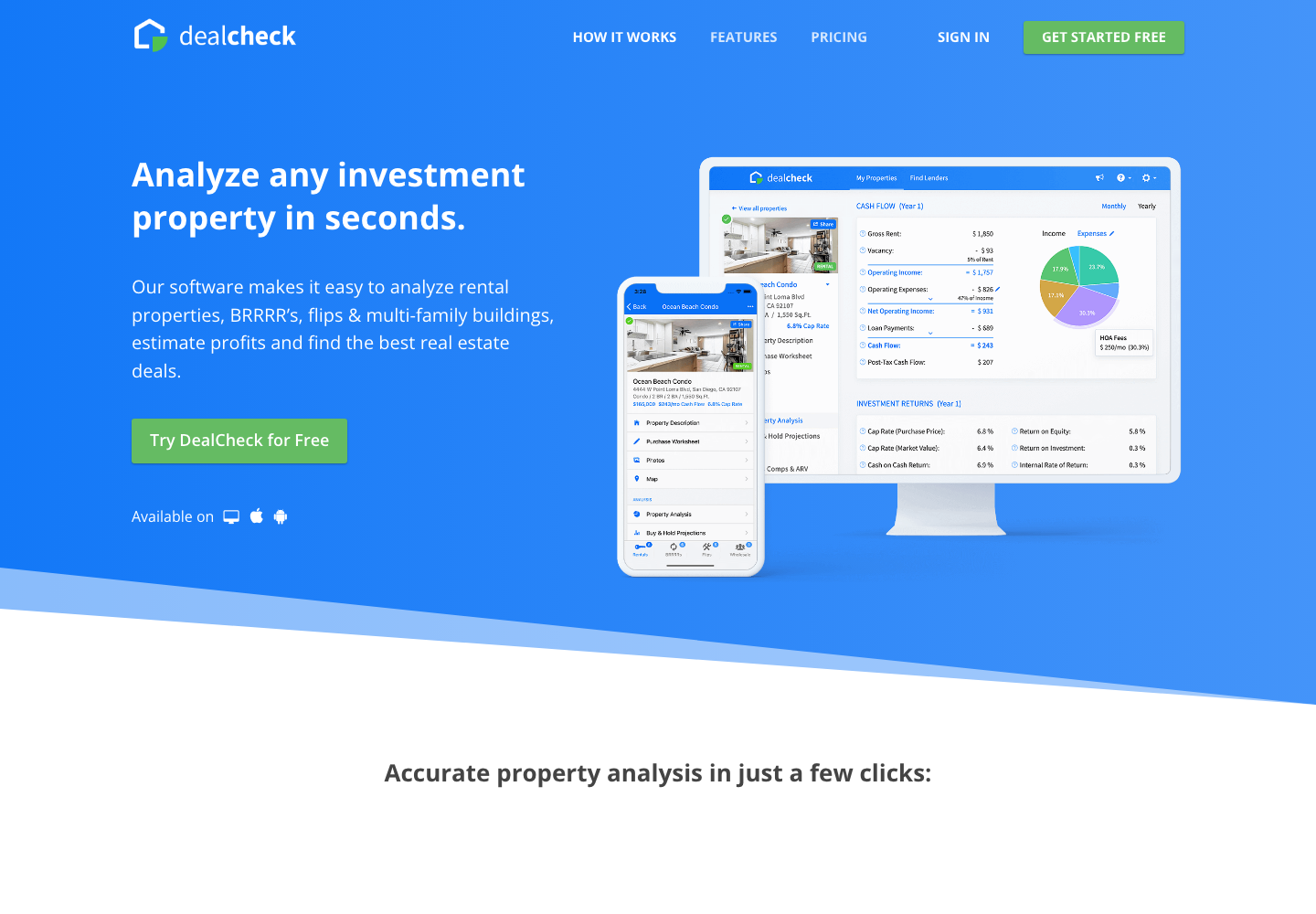
Finding an accurate, easy-to-use real estate calculator is one of the first major hurdles for any serious investor, and this DealCheck review examines whether the platform lives up to its reputation. Endorsed across investor forums and podcasts like BiggerPockets, DealCheck promises to simplify property analysis, automate sales comps, and eliminate messy desktop spreadsheets. But does this cloud-based software justify a spot in your tech stack, or is it merely a glorified digital calculator?
In this comprehensive DealCheck review, we conduct a hands-on evaluation of the platform's core features, test its underwriting calculations, inspect its sales comps engine, review pricing as of September 2026, and weigh its genuine advantages against its practical limitations. Whether you are a buy-and-hold landlord, a fix-and-flip investor, or a wholesaler underwriting quick assignment fees, this DealCheck review will help you decide if DealCheck is the right fit for your business.
TL;DR: DealCheck Review Summary and Scorecard
If you need a quick verdict, here is our bottom-line DealCheck review scorecard:
- Overall Score: 4.6 / 5.0: DealCheck is one of the cleanest, fastest, and most dependable financial underwriting tools available for residential real estate investors.
- Top Strengths: Fast property import from public data, deep multi-year cash flow projections, customizable rehab cost worksheets, reverse-engineered offer calculators, and professional PDF reports.
- Main Drawbacks: Not a lead generation platform; you cannot search for distressed off-market sellers or pull cold-calling lists. Its comps engine relies on public county records rather than direct broker MLS integration.
- Best Alternative for Rapid ARV: If you only need fast after repair value calculations and 70% rule screening without configuring multi-tab rental models, testing the address in the free ARV calculator provides an instant, focused alternative.
The table below summarizes the key findings of our DealCheck review:
| Evaluation Dimension | Rating / Finding | Key Takeaway from This DealCheck Review |
|---|---|---|
| Financial Underwriting | 4.9 / 5.0 | Best-in-class multi-year projections for buy-and-hold, BRRRR, flips, and commercial |
| User Experience & Speed | 4.8 / 5.0 | Intuitive web interface and native iOS/Android apps with cloud synchronization |
| Reporting & Presentations | 4.7 / 5.0 | Clean, customizable PDF pitch decks designed for lenders and private money partners |
| Comps & Valuation Data | 3.9 / 5.0 | Good public records comping via RentCast, but lacks live broker MLS pending status |
| Lead Generation Capabilities | 1.0 / 5.0 | Zero outbound prospecting tools; requires entering specific known addresses |
| Pricing & Value (as of September 2026) | 4.7 / 5.0 | Generous free tier; Plus at $14/mo ($10/mo annual); Pro at $29/mo ($20/mo annual) |
What Is DealCheck? Background and Architecture
To begin this DealCheck review, it helps to understand what the software is designed to accomplish. Founded by real estate investor and software engineer Anton Ivanov, DealCheck was built to bridge the gap between simple online mortgage widgets and bloated Excel spreadsheets that are prone to formula errors.
DealCheck operates on a straightforward principle: input property details once, and the software automatically calculates every critical real estate metric, including cash-on-cash return, capitalization rate (cap rate), net operating income (NOI), internal rate of return (IRR), and debt service coverage ratio (DSCR).
As our DealCheck review revealed during testing, DealCheck is strictly an underwriting and analysis platform. It is not an outreach database like PropStream or BatchLeads. It assumes you already have a lead or listing in mind and need to answer a single question: At what price does this deal make financial sense?
Hands-On Feature Testing: What We Found in Our DealCheck Review
To give this DealCheck review practical value, we tested each primary component of the platform across residential single-family, BRRRR, and flip scenarios.
1. Automated Property Data Import
One of the most time-saving elements discovered in our DealCheck review is the automated property import tool. When evaluating an address, you simply paste the property URL from Zillow, Redfin, or Realtor.com, or type the physical address.
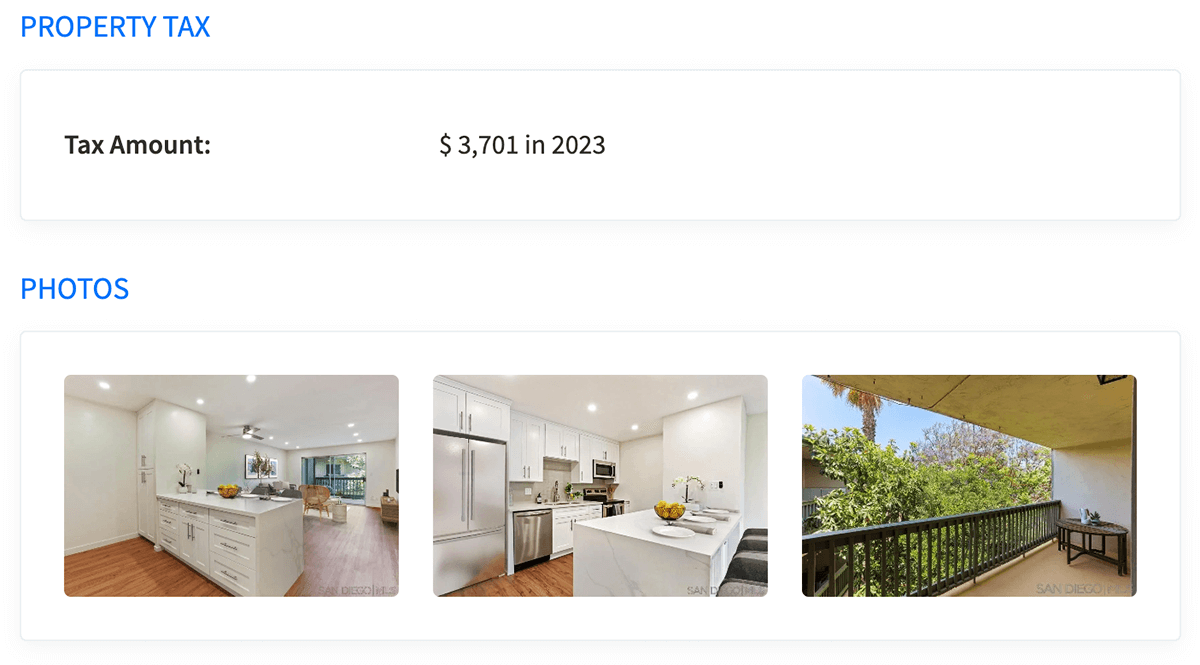
DealCheck queries public records and listing syndication feeds to automatically populate:
- Property specifications (bedrooms, bathrooms, square footage, lot size, year built).
- Annual property tax assessments and historical tax records.
- Estimated purchase prices, current listing photos, and HOA dues where applicable.
In our DealCheck review tests, this auto-fill feature reduced initial property setup time from ten minutes on a spreadsheet to under thirty seconds.
2. The Deal Worksheet: Purchase, Rehab, and Financing
The heart of DealCheck is its interactive worksheet. Unlike rigid formulas, DealCheck allows you to customize every financing scenario imaginable.
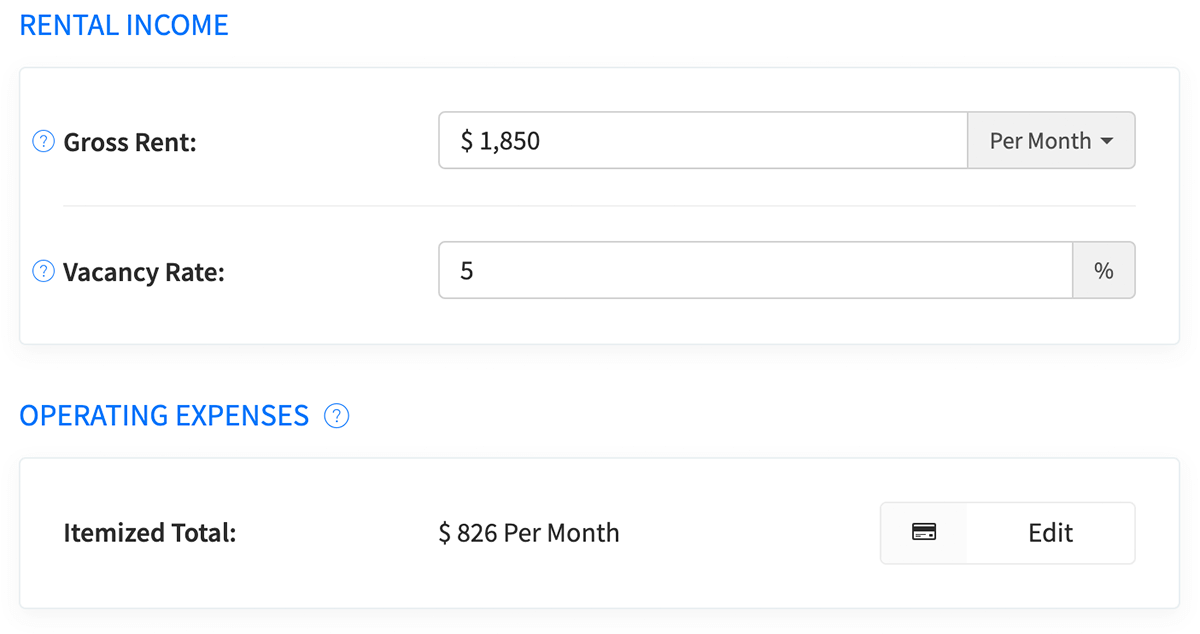
During our DealCheck review, we found the financing tab particularly thorough:
- Conventional and FHA Mortgages: Specify down payment percentages, interest rates, loan terms, and private mortgage insurance (PMI).
- Interest-Only and Bridge Financing: Model short-term hard money loans with origination points and interest reserves for fix-and-flips.
- Seller Financing and Second Mortgages: Split capital stacks across primary loans and owner-held second notes.
- Rehab Cost Worksheet: Itemize repair categories, from roof and HVAC replacements to cosmetic paint and flooring allowances.
3. Financial Analysis and Performance Projections
Once your parameters are entered, DealCheck generates a comprehensive financial breakdown.
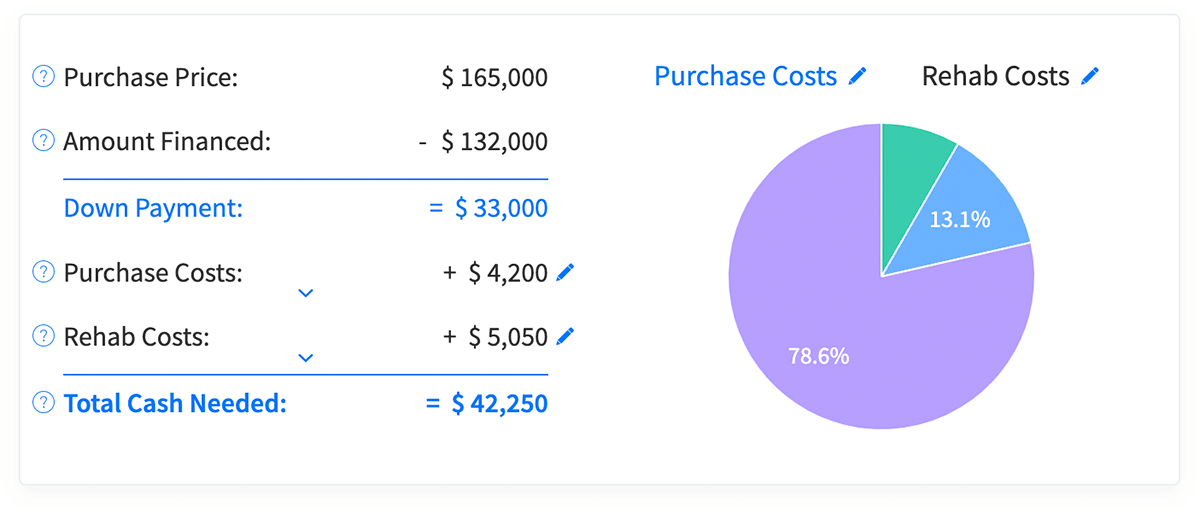
In our DealCheck review of buy-and-hold properties, the platform produced detailed multi-year cash flow projections extending up to 30 years. It accounts for:
- Income growth rates and operating expense inflation over time.
- Vacancy buffers and capital expenditure (CapEx) reserve reserves.
- Tax depreciation schedules according to IRS Publication 527 rules.
- Equity accumulation across loan paydown and projected market appreciation.
For BRRRR investors (Buy, Rehab, Rent, Refinance, Repeat), DealCheck models the exact cash required during phase one, calculates the refinance proceeds based on your target LTV, and reveals how much capital remains trapped in the property long-term.
4. Sales and Rental Comps Engine
The integrated comps tool was an essential focal point of our DealCheck review. To calculate an accurate after repair value, investors need recent, nearby sold comps, consistent with Fannie Mae appraisal standards.
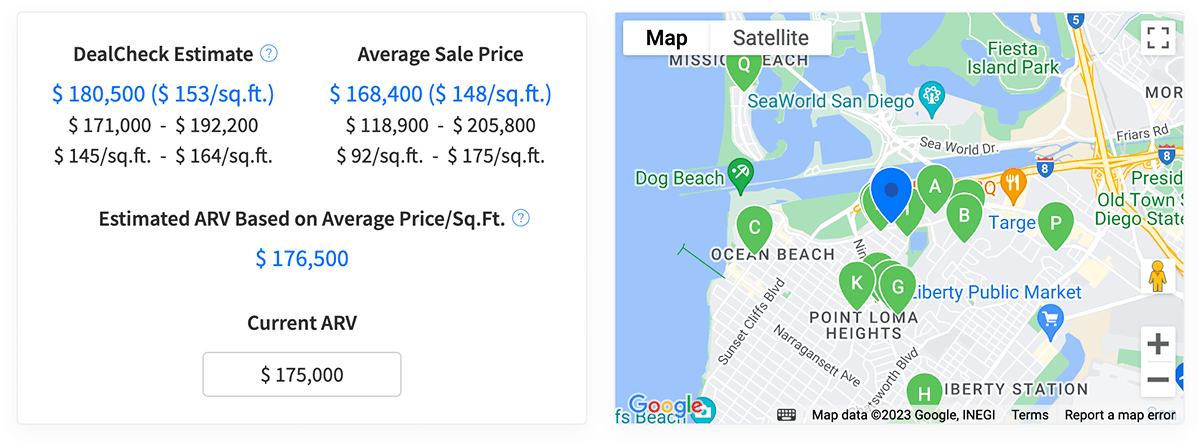
DealCheck sources comparable sales and active rental comps via RentCast. The tool displays comparable listings on an interactive map, calculates the average price per square foot, and provides an estimated market value and rent range.
Our DealCheck review noted that while DealCheck lets you manually exclude non-comparable properties and adjust for square footage variances, its comp data is based on public recorded deeds. In non-disclosure states or rural markets, these comps can occasionally lag real-time MLS sales by several weeks.
5. Purchase Offer Calculator
One of the standout utilities highlighted in this DealCheck review is the reverse purchase offer calculator.
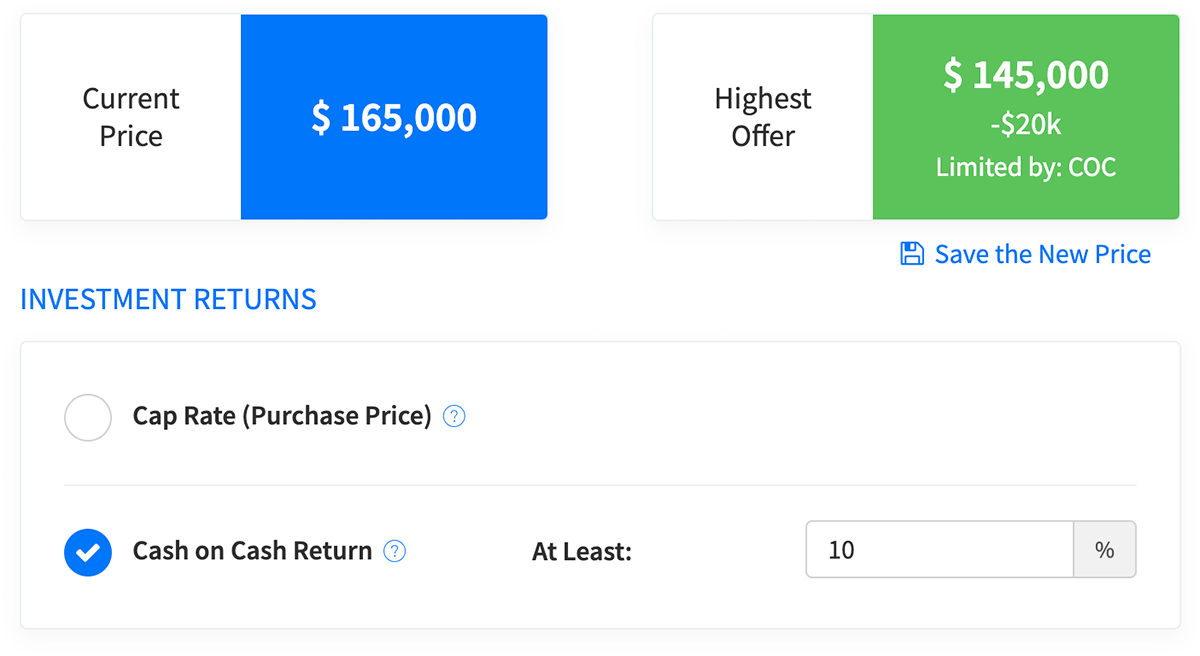
Instead of manually guessing purchase numbers until your desired returns appear, you define your minimum return threshold — such as a 12% cash-on-cash return, an 8% cap rate, or a $500 monthly cash flow target. DealCheck automatically reverse-engineers the maximum allowable offer (MAO) you can submit to hit those criteria.
This mirrors the standard after repair value formula discussed in our guide on how to calculate ARV and the 70% rule, making it invaluable when negotiating with sellers or wholesalers.
6. Professional PDF Investment Reports
For investors seeking private capital or commercial financing, our DealCheck review confirmed that DealCheck's reporting engine is among the best in the industry.
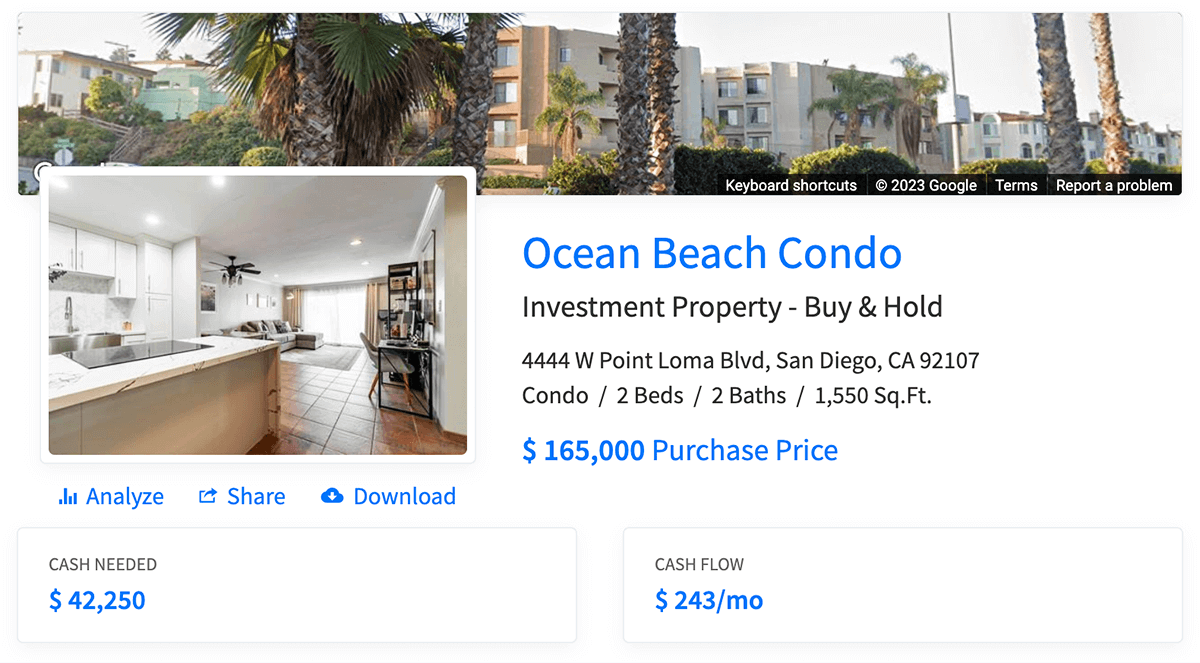
Pro plan users can generate clean, multi-page PDF reports that include:
- Executive deal summaries and property photos.
- Itemized rehab budgets and projected cash requirements.
- Multi-year cash flow statements and amortization schedules.
- Custom logos, company contact information, and disclaimer footers.
These reports look identical to packages created by professional private equity firms, dramatically improving your credibility when approaching lenders.
DealCheck Pricing Breakdown (as of September 2026)
Our DealCheck review found the platform's pricing structure refreshingly straightforward compared to enterprise real estate software:
| Plan | Monthly Cost | Annual Cost (Billed Annually) | Key Inclusions |
|---|---|---|---|
| Starter | $0 / month | $0 / year | 15 saved properties, 5 photos, 5 sales & rental comps per property |
| Plus | $14 / month | $10 / mo ($120 / year) | 50 saved properties, 15 photos, 10 comps, custom purchase criteria |
| Pro | $29 / month | $20 / mo ($240 / year) | Unlimited properties, unlimited comps, custom branding, PDF exports |
Current plan tiers and feature comparisons can be confirmed directly on the official DealCheck pricing page.
In our DealCheck review, the free Starter tier proved remarkably functional. Unlike competitors that lock core calculators behind short 7-day trials, DealCheck's free plan can be used permanently by investors analyzing occasional properties.
Honest Pros and Cons from Our DealCheck Review
An objective DealCheck review must outline both the strengths and the genuine weaknesses of the platform.
Pros: Where DealCheck Excels
- Blazing Fast Underwriting: Completing a comprehensive cash flow analysis takes under three minutes.
- Outstanding Mobile Apps: Native iOS and Android apps allow seamless property underwriting during walkthroughs.
- Flexible Financing Capabilities: Easily models private money, hard money, seller financing, and BRRRR equity cash-outs.
- Lender-Ready PDF Pitch Decks: Generates professional investment summaries that impress private lenders and loan officers.
- Exceptional Value for Money: The free tier is generous, and the Pro plan costs less than a single dinner out each month.
Cons: Where DealCheck Falls Short
- No Lead Generation Tools: DealCheck cannot search for tax-delinquent properties, tired landlords, or pre-foreclosure lists.
- Comps Depend on Public Records: In non-disclosure states, deed data may be delayed compared to direct MLS broker feeds.
- No Construction Cost Database: While you can itemize repairs, DealCheck does not provide regional labor and material cost estimates like Bluehammer or RSMeans.
Alternative Perspective: When ARVHQ Fits Better
As part of this DealCheck review, it is important to acknowledge scenarios where DealCheck might actually be more software than you need.
If you are an active flipper or wholesaler who reviews dozens of addresses every week, building full multi-year rental pro-formas in DealCheck for every raw lead creates unnecessary friction. Often, all you need is an immediate after repair value and maximum allowable offer to filter out bad deals.
That is where ARVHQ provides a faster, specialized alternative. Using our free ARV calculator, investors can input a property address and instantly generate an ARV range, comparable sales with similarity scores, and a 70% rule MAO calculation, backed by detailed methodologies explained in our guide on how to find comps in real estate.
A note on transparency: ARVHQ is operated by the team behind this article, and its comps come from RentCast's nationwide database of public county-recorded sales — not real-time MLS feeds. Data sources and AI involvement are described on our AI disclosure page. New accounts get three free reports, and for high-stakes deals we always recommend verifying any automated estimate against your own comp check or a licensed appraisal.
Who Should Use DealCheck? (And Who Should Skip It)
To conclude this DealCheck review with actionable advice, here is our breakdown of who benefits most from the platform:
You Should Use DealCheck If:
- You are a Buy-and-Hold Landlord: You need accurate monthly cash flow, CapEx forecasting, and long-term equity projections.
- You are a BRRRR Investor: You want to calculate initial rehab capital and model the exact cash-out refinance returns.
- You are Pitching Private Money: You want to present polished PDF summaries to lenders and capital partners.
- You are on a Budget: You want professional-grade financial analysis without paying $100+ per month for enterprise suites.
Start testing the software directly on the DealCheck official site.
You Should Skip DealCheck If:
- You Need Cold Off-Market Leads: If you are hunting for vacant properties or tax liens, you need PropStream or BatchLeads.
- You Underwrite Large Commercial Syndications: For 100+ unit apartment complexes requiring complex equity waterfall structures, an enterprise Excel model is necessary.
Frequently Asked Questions from Our DealCheck Review
Here are direct answers to the questions investors ask most frequently about DealCheck:
Is DealCheck completely free?
Yes, DealCheck offers a permanent free Starter tier that lets investors save up to 15 properties and view up to 5 comps per deal without requiring a credit card. Paid plans ($14 to $29 per month) unlock unlimited property saves, expanded comps, custom branding, and PDF exports.
How accurate is the DealCheck ARV and comps data?
DealCheck comps are pulled through RentCast from public county records and deed registries, providing reliable market values in most residential US markets. However, because it relies on recorded public data rather than direct MLS pending feeds, investors evaluating high-stakes flips should verify automated comps against an appraisal or local MLS sales.
Does DealCheck have a mobile app?
Yes, DealCheck features fully functional mobile apps for both iOS and Android. Unlike many desktop-heavy real estate tools, DealCheck's mobile app includes complete property underwriting, photo uploading, and comp review features that sync in real time with your web account.
Is DealCheck Pro worth the upgrade?
DealCheck Pro is well worth the upgrade for active investors who analyze more than 15 deals per month or who need professional PDF reports to present to lenders. At $20 per month billed annually ($240 per year), the cost is negligible compared to the professional image it provides when securing financing.
Final Verdict: DealCheck Review
To summarize this DealCheck review: DealCheck is easily one of the most effective, reliable, and value-packed underwriting tools on the market today. It does not try to be an all-in-one lead generation platform, and that focus is precisely why it succeeds.
If your goal is to eliminate spreadsheet errors, underwrite properties in minutes, and present clean numbers to lenders, DealCheck earns our highest recommendation. And when you need to quickly sanity-check after repair values before doing a deep analysis, pair it with our free ARV calculator for an optimal real estate workflow.